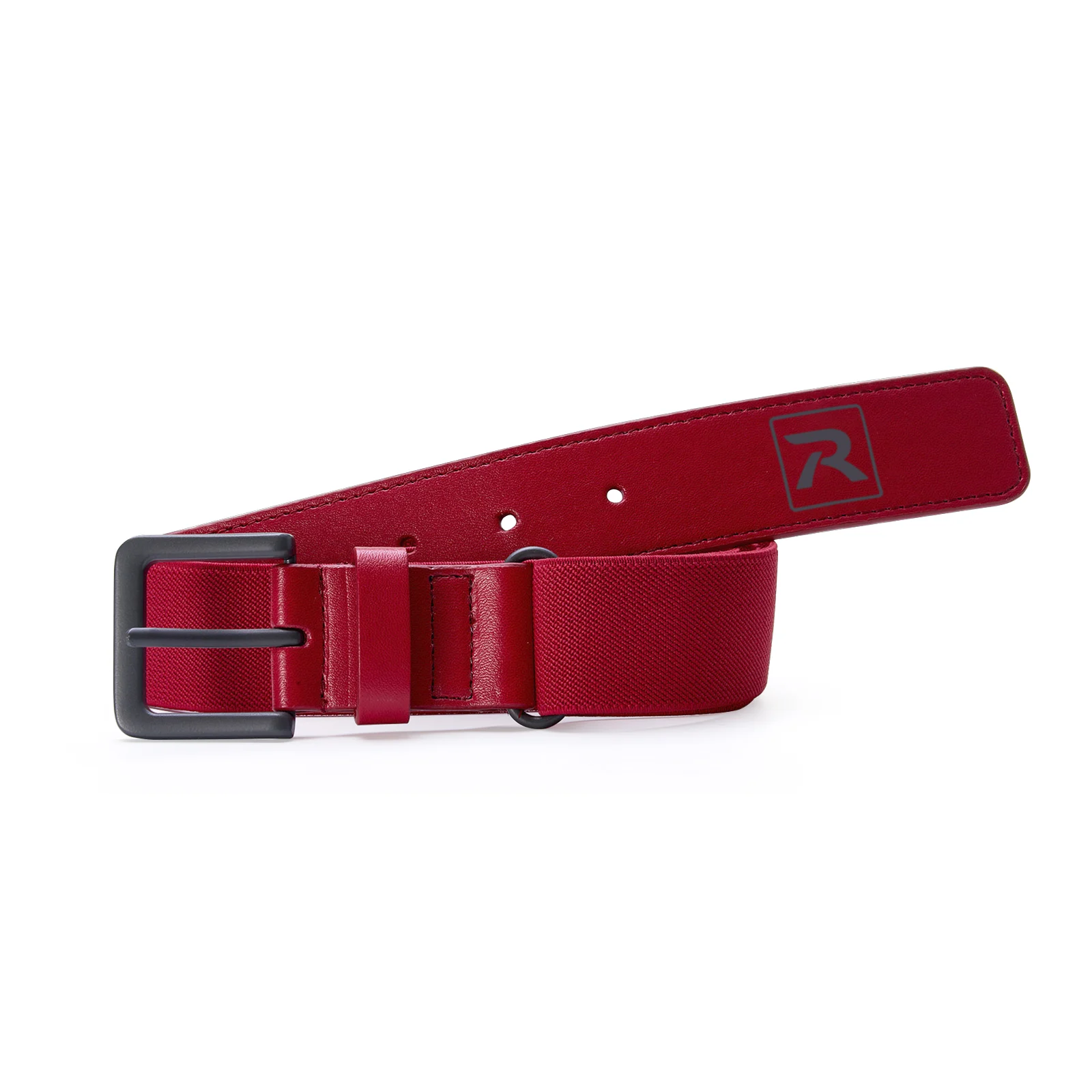
Complete your team’s gameday look with our PTS Signature Belt. Built to last with premium powder-coated metal hardware and PU-coated synthetic leather tabs, while heavy-duty elastic webbing ensures a versatile, performance-focused fit.
Features and Benefits
Premium powder-coated metal hardware gives a clean, durable finish
PU-coated synthetic leather tabs provide durability and a classic look
Heavy-duty elastic webbing gives an adaptable performance fit
Color:Select Color
Technical Specs
Style: Webbed
Age: Youth
Sizing Options
Youth
SIZE INFORMATION
Youth: 23.5″ – 34″
Camper caps
Adjustable Sizing
Head Size (IN)
Head Size (CM)
Adjustable
20"
20 3/8"
20 3/4"
21 1/4"
21 5/8"
22"
22 3/8"
22 3/4"
23 1/8"
23 1/2"
23 7/8"
24 1/4"
24 5/8"
25"
51 cm
52 cm
53 cm
54 cm
55 cm
56 cm
57 cm
58 cm
59 cm
60 cm
61 cm
62 cm
63 cm
64 cm
Youth
OSFM & MD-LG
SM
XL
Scroll horizontally to see more
HOW TO FIND THE RIGHT SIZE
Ensure the tape measure is straight and not twisted to obtain an accurate measurement.
If a tape measure isn’t available, use a piece of string to encircle your head, then measure the length of the string with a ruler.
If uncertain about the size or in between sizes, opt for the larger size to ensure a comfortable fit.
Relaxed caps
R-Flex & Adjustable Sizing
Head Size (IN)
Head Size (CM)
R-Flex
Adjustable
20"
20 3/8"
20 3/4"
21 1/4"
21 5/8"
22"
22 3/8"
22 3/4"
23 1/8"
23 1/2"
23 7/8"
24 1/4"
24 5/8"
25"
51 cm
52 cm
53 cm
54 cm
55 cm
56 cm
57 cm
58 cm
59 cm
60 cm
61 cm
62 cm
63 cm
64 cm
Youth*
SM-MD
XS-SM
LG-XL
Youth
OSFM & MD-LG
SM
XL
*Youth sizes available for PTS20 & PTS30 in select colorways.
Scroll horizontally to see more
HOW TO FIND THE RIGHT SIZE
Ensure the tape measure is straight and not twisted to obtain an accurate measurement.
If a tape measure isn’t available, use a piece of string to encircle your head, then measure the length of the string with a ruler.
If uncertain about the size or in between sizes, opt for the larger size to ensure a comfortable fit.
Smart 7 caps
Adjustable Sizing
Head Size (IN)
Head Size (CM)
Adjustable
20"
20 3/8"
20 3/4"
21 1/4"
21 5/8"
22"
22 3/8"
22 3/4"
23 1/8"
23 1/2"
23 7/8"
24 1/4"
24 5/8"
25"
51 cm
52 cm
53 cm
54 cm
55 cm
56 cm
57 cm
58 cm
59 cm
60 cm
61 cm
62 cm
63 cm
64 cm
Youth
OSFM & MD-LG
SM
XL
Scroll horizontally to see more
HOW TO FIND THE RIGHT SIZE
Ensure the tape measure is straight and not twisted to obtain an accurate measurement.
If a tape measure isn’t available, use a piece of string to encircle your head, then measure the length of the string with a ruler.
If uncertain about the size or in between sizes, opt for the larger size to ensure a comfortable fit.
Gramps caps
Adjustable Sizing
Head Size (IN)
Head Size (CM)
Adjustable
20"
20 3/8"
20 3/4"
21 1/4"
21 5/8"
22"
22 3/8"
22 3/4"
23 1/8"
23 1/2"
23 7/8"
24 1/4"
24 5/8"
25"
51 cm
52 cm
53 cm
54 cm
55 cm
56 cm
57 cm
58 cm
59 cm
60 cm
61 cm
62 cm
63 cm
64 cm
Youth
OSFM & MD-LG
SM
XL
Scroll horizontally to see more
HOW TO FIND THE RIGHT SIZE
Ensure the tape measure is straight and not twisted to obtain an accurate measurement.
If a tape measure isn’t available, use a piece of string to encircle your head, then measure the length of the string with a ruler.
If uncertain about the size or in between sizes, opt for the larger size to ensure a comfortable fit.
Champ caps
Adjustable Sizing
Head Size (IN)
Head Size (CM)
Adjustable
20"
20 3/8"
20 3/4"
21 1/4"
21 5/8"
22"
22 3/8"
22 3/4"
23 1/8"
23 1/2"
23 7/8"
24 1/4"
24 5/8"
25"
51 cm
52 cm
53 cm
54 cm
55 cm
56 cm
57 cm
58 cm
59 cm
60 cm
61 cm
62 cm
63 cm
64 cm
Youth
OSFM & MD-LG
SM
XL
Scroll horizontally to see more
HOW TO FIND THE RIGHT SIZE
Ensure the tape measure is straight and not twisted to obtain an accurate measurement.
If a tape measure isn’t available, use a piece of string to encircle your head, then measure the length of the string with a ruler.
If uncertain about the size or in between sizes, opt for the larger size to ensure a comfortable fit.
High Pro caps
Adjustable Sizing
Head Size (IN)
Head Size (CM)
Adjustable
20"
20 3/8"
20 3/4"
21 1/4"
21 5/8"
22"
22 3/8"
22 3/4"
23 1/8"
23 1/2"
23 7/8"
24 1/4"
24 5/8"
25"
51 cm
52 cm
53 cm
54 cm
55 cm
56 cm
57 cm
58 cm
59 cm
60 cm
61 cm
62 cm
63 cm
64 cm
Youth
OSFM & MD-LG
SM
XL
Scroll horizontally to see more
HOW TO FIND THE RIGHT SIZE
Ensure the tape measure is straight and not twisted to obtain an accurate measurement.
If a tape measure isn’t available, use a piece of string to encircle your head, then measure the length of the string with a ruler.
If uncertain about the size or in between sizes, opt for the larger size to ensure a comfortable fit.
Low Pro caps
R-Flex & Adjustable Sizing
Head Size (IN)
Head Size (CM)
R-Flex
Adjustable
20"
20 3/8"
20 3/4"
21 1/4"
21 5/8"
22"
22 3/8"
22 3/4"
23 1/8"
23 1/2"
23 7/8"
24 1/4"
24 5/8"
25"
51 cm
52 cm
53 cm
54 cm
55 cm
56 cm
57 cm
58 cm
59 cm
60 cm
61 cm
62 cm
63 cm
64 cm
Youth*
SM-MD
XS-SM
LG-XL
Youth
OSFM & MD-LG
SM
XL
*Youth sizes available for PTS20 & PTS30 in select colorways.
Scroll horizontally to see more
HOW TO FIND THE RIGHT SIZE
Ensure the tape measure is straight and not twisted to obtain an accurate measurement.
If a tape measure isn’t available, use a piece of string to encircle your head, then measure the length of the string with a ruler.
If uncertain about the size or in between sizes, opt for the larger size to ensure a comfortable fit.
Mid Pro caps
R-Flex & Adjustable Sizing
Head Size (IN)
Head Size (CM)
R-Flex
Adjustable
20"
20 3/8"
20 3/4"
21 1/4"
21 5/8"
22"
22 3/8"
22 3/4"
23 1/8"
23 1/2"
23 7/8"
24 1/4"
24 5/8"
25"
51 cm
52 cm
53 cm
54 cm
55 cm
56 cm
57 cm
58 cm
59 cm
60 cm
61 cm
62 cm
63 cm
64 cm
Youth*
SM-MD
XS-SM
LG-XL
Youth
OSFM & MD-LG
SM
XL
*Youth sizes available for PTS20 & PTS30 in select colorways.
Scroll horizontally to see more
HOW TO FIND THE RIGHT SIZE
Ensure the tape measure is straight and not twisted to obtain an accurate measurement.
If a tape measure isn’t available, use a piece of string to encircle your head, then measure the length of the string with a ruler.
If uncertain about the size or in between sizes, opt for the larger size to ensure a comfortable fit.
Full Pro caps
Fitted & R-Flex Sizing
Head Size (IN)
Head Size (CM)
Fitted
R-Flex
20"
20 3/8"
20 3/4"
21 1/4"
21 5/8"
22"
22 3/8"
22 3/4"
23 1/8"
23 1/2"
23 7/8"
24 1/4"
24 5/8"
25"
51 cm
52 cm
53 cm
54 cm
55 cm
56 cm
57 cm
58 cm
59 cm
60 cm
61 cm
62 cm
63 cm
64 cm
6 3/8**
6 1/2**
6 5/8
6 3/4
6 7/8
7
7 1/8
7 1/4
7 3/8
7 1/2
7 5/8
7 3/4
7 7/8
8
Youth*
SM-MD
XS-SM
LG-XL
*Youth sizes available for PTS20 & PTS30 in select colorways.
**For fitted size reference only, not stocked.
Scroll horizontally to see more
HOW TO MEASURE
Using a tape measure, position it around your head approximately one-half inch above your eyebrows, where your hat will sit.
Ensure the tape measure is straight and not twisted to obtain an accurate measurement.
If a tape measure isn’t available, use a piece of string to encircle your head, then measure the length of the string with a ruler.
If uncertain about the size or in between sizes, opt for the larger size to ensure a comfortable fit.
Full Pro2 caps
R-Flex, Adjustable & System 5 Sizing
Head Size (IN)
Head Size (CM)
R-Flex
Adjustable
System 5
20"
20 3/8"
20 3/4"
21 1/4"
21 5/8"
22"
22 3/8"
22 3/4"
23 1/8"
23 1/2"
23 7/8"
24 1/4"
24 5/8"
25"
51 cm
52 cm
53 cm
54 cm
55 cm
56 cm
57 cm
58 cm
59 cm
60 cm
61 cm
62 cm
63 cm
64 cm
Youth*
SM-MD
XS-SM
LG-XL
Youth
OSFM & MD-LG
SM
XL
XS
SM
MD
LG
XL
*Youth sizes available for PTS20 & PTS30 in select colorways.
Scroll horizontally to see more
HOW TO MEASURE
Using a tape measure, position it around your head approximately one-half inch above your eyebrows, where your hat will sit.
Ensure the tape measure is straight and not twisted to obtain an accurate measurement.
If a tape measure isn’t available, use a piece of string to encircle your head, then measure the length of the string with a ruler.
If uncertain about the size or in between sizes, opt for the larger size to ensure a comfortable fit.
Reporting an Issue
Helpful information to include:
Description
– What issue are you experiencing?
Steps Taken / How It Occurred
– What were you doing when the issue happened?
Description
– What issue are you experiencing?
Expected Result
– What should have happened?
Actual Result
– What happened instead?
Frequency
– Does this happen every time or only sometimes?
Screenshots or Videos (if available)
– Visuals are extremely helpful.
Device / Browser (if applicable)
– Especially for customizer issues.
How to Update Google Chrome
To update Google Chrome, follow these steps:
For Windows, macOS, and Linux:
1. Open the Chrome browser.
2. Click on the three dots (⋮) in the top-right corner.
3. Choose Help > About Google Chrome.
4. If an update is available, click Check for updates.
5. When the update is finished, click Relaunch. If no updates are available, you’ll see a message that Chrome is up to date.
For Android devices:
1. Open the Google Play app.
2. Tap your profile picture in the top-right corner.